
Launchible, the GTM Operating System, organizes everything your GTM motions depend on into six integrated Hubs: Product Hub, Audience Hub, Competitor Hub, Pricing Hub, Launch Hub, and Sales Assets Hub. Single Source of Truth for Product Launch: 6 Hubs covers how they fit together. This post goes deep on the Sales Assets Hub and the question every product marketer who owns sales collateral eventually has to answer under pressure: which version are reps using right now?
The answer starts with a shift most teams never make. Approval isn't a moment. It's a state.
Thursday, 3:40 p.m.
Legal's message landed at 3:40 on a Thursday afternoon. Marcus, the company's counsel, skipped the greeting. "The auditor just pushed our SOC 2 report to next quarter. Our security one-pager says the audit is complete. Pull it. And tell me which version reps are sending right now."
Priya owned the one-pager. She knew exactly which version she'd approved: version five, cleared by Marcus himself in an email thread in March, sitting in the enablement folder with APPROVED in the file name. The claim was true when he cleared it. The fieldwork was done and the report was weeks away. Then it wasn't.
Version five was the easy part. Priya replaced the file in the folder in ten minutes. Marcus's question was the hard part. Version four was still in the regional team's drive, because they'd translated it. A PDF of version five was attached to the email template the SDRs used for every security question. Two account executives had dropped copies into deal rooms. One rep kept a "best of" folder on his laptop and was proud of it.
Priya posted in the sales channel: please delete any old copies of the security one-pager and use the one in the folder. It was a request, not a control. At 6:15 she wrote back to Marcus. The honest answer was "I don't know," and she spent three paragraphs not quite saying it.
The standard advice for outdated sales collateral
Ask how to keep reps from using outdated sales collateral and you'll get the same advice almost everywhere. Keep one central library. Put version numbers in file names. Get approval before anything goes in. Add a "last reviewed" date and review on a schedule. Tell reps to download a fresh copy every time.
Priya's team did all of it. The library existed. The file name had a version number and APPROVED in capitals. Legal had signed off in writing. A quarterly review sat on the calendar, six weeks out.
All of that advice treats sales collateral approval as a gate. The asset passes through once, someone says yes, and from then on it's approved. That's exactly where it breaks.
Approval isn't a moment. It's a state.
Here's the uncomfortable truth. "Approved" isn't something that happened to an asset in March. It's a condition that has to stay true for as long as reps use the asset, and on most teams nothing keeps it true.
An approval belongs to one version of one file, and nothing holds it there. Someone fixes a typo after legal signs off and, while they're in the file, tightens a claim. The file still says APPROVED. A newer version gets approved, and the older one keeps circulating with the same word in its name. Or nobody touches the file at all, and something it says stops being true, the way the audit claim did. The approval is still on record. The asset is no longer ready.
So an asset is ready only while two things are true at once: it's approved, and it's current. Lose either one and you have a document that looks finished and isn't. A folder of files marked FINAL and APPROVED, where nobody can say which one reps are sending, is Readiness Theater™ for sales collateral: it looks ready, and nobody can say how they know.
Priya's team never skipped approval. Their approval just had no way to stay attached to the right version, and no way to be taken back.
How do you make sure reps only use approved sales collateral?
You stop treating approval as a stamp and start treating it as a state the system holds. Three rules do most of the work.
Approval belongs to a version, and that version freezes. What legal reviewed is exactly what reps get. Nobody edits an approved asset in place.
Change creates a new version, and the old one stays current until the new one is approved. Reps always have one current, approved version. Never a half-reviewed one, and never two to choose from.
Pulling an asset back is one deliberate action, not a Slack request. When something is wrong, the asset stops being available right away, someone records why, and nobody quietly puts it back.
None of that asks reps to be more careful. It asks for a different structure, and that structure is what the Launchible Sales Assets Hub is built on.
Three approvals, three different questions
Every sales asset in the Sales Assets Hub moves through three approval stages: content and brand, legal and compliance, and final sign-off. Each stage has its own approver.
That split matters more than it looks. The person who can tell you whether a one-pager is on message isn't the person who can tell you whether "audit complete" is a claim you're allowed to make. On a typical team, product marketing owns content and brand, legal or compliance owns the second stage, and a marketing or sales leader gives final sign-off. Each approver answers the question they're qualified to answer, and the asset isn't approved until all three have.
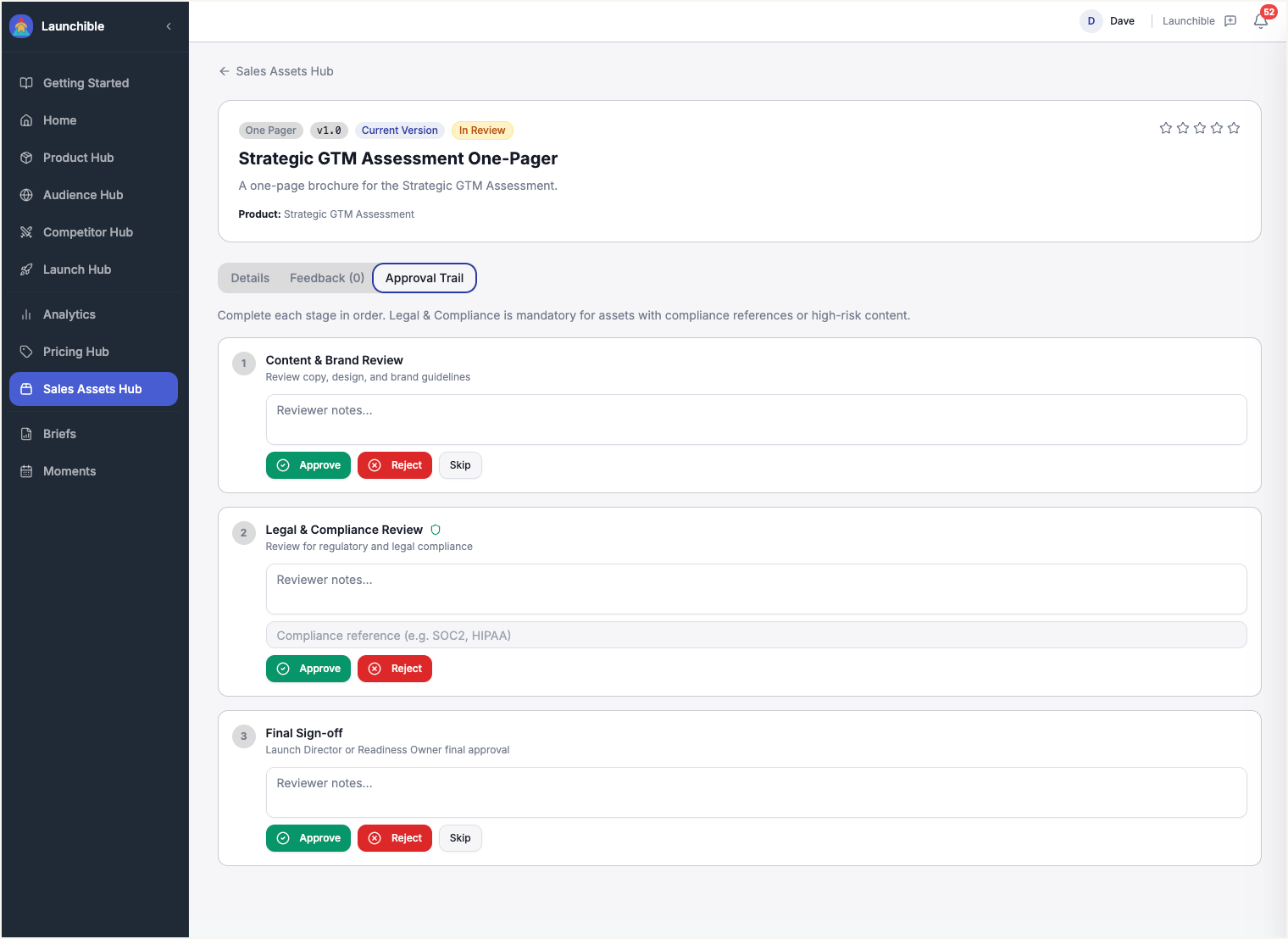
Every sales asset passes content and brand, legal and compliance, and final sign-off, each with its own approver.
If you read the Audience Hub deep-dive or the Competitor Hub deep-dive, the approval idea will look familiar. The difference here is how many questions one asset has to survive. A competitive claim is one fact. A sales asset makes many claims at once, in your brand's voice, in front of a buyer, and the company has to stand behind every one of them.
Approved means locked
An asset can't be edited while it's in review, and it can't be edited once it's approved. What the legal approver read is exactly what reps get.
That closes the quietest route to an unapproved asset: the small edit after the yes. In Priya's folder, APPROVED in a file name described a version that might no longer exist. In the Sales Assets Hub, approved describes the exact content in front of the rep.
Changing an approved asset creates a new version
Assets have to change. Pricing moves, the product ships a new capability, a customer story gets cleared for use. In the Sales Assets Hub, you change an approved asset by creating a new version, and the new version goes back through review, all three stages.
Meanwhile, the version reps already use stays current. Nothing disappears while legal reads the update. When the new version is approved, it becomes current and the old one is superseded. Reps never have two versions to choose from, and they're never handed a draft because the approved version was being edited.
That's what one current, approved version means in practice. It isn't a naming convention. It's the only version reps can find.
Recall is for when it can't wait
New versions handle change you can plan. Marcus's message wasn't that kind of change.
For the moment an asset has to stop now, the Sales Assets Hub has emergency recall. It makes the asset unavailable right away. It requires a reason, so the record shows why the asset came down. It's held by its own permission, so you decide who can pull an asset, separately from who can edit one. And it can't be undone. Nobody quietly restores a recalled asset because a deal closes tomorrow. The fix goes out as a new version, through review like any other.
Recall has a limit, and it's worth being plain about it. It controls what reps can get from the Hub. It doesn't reach into an inbox, a deal room or a laptop. A copy a rep sent last month is still out there, and no system can claw it back. What recall guarantees is that from the moment you pull an asset, no rep picks it up from the place they've been told to go.
Built for the reps who use it
A library of approved assets still fails if reps can't find the right one. Assets in the Sales Assets Hub are tagged by buyer journey stage, so a rep in a late-stage evaluation finds the security one-pager and the ROI deck, not the explainer written for first conversations.
The Hub also holds internal sales insights: the deal intelligence your team gathers about what works in real conversations. Insights go through their own approval, so a tactic that worked on one call doesn't become guidance until someone who knows signs off on it.
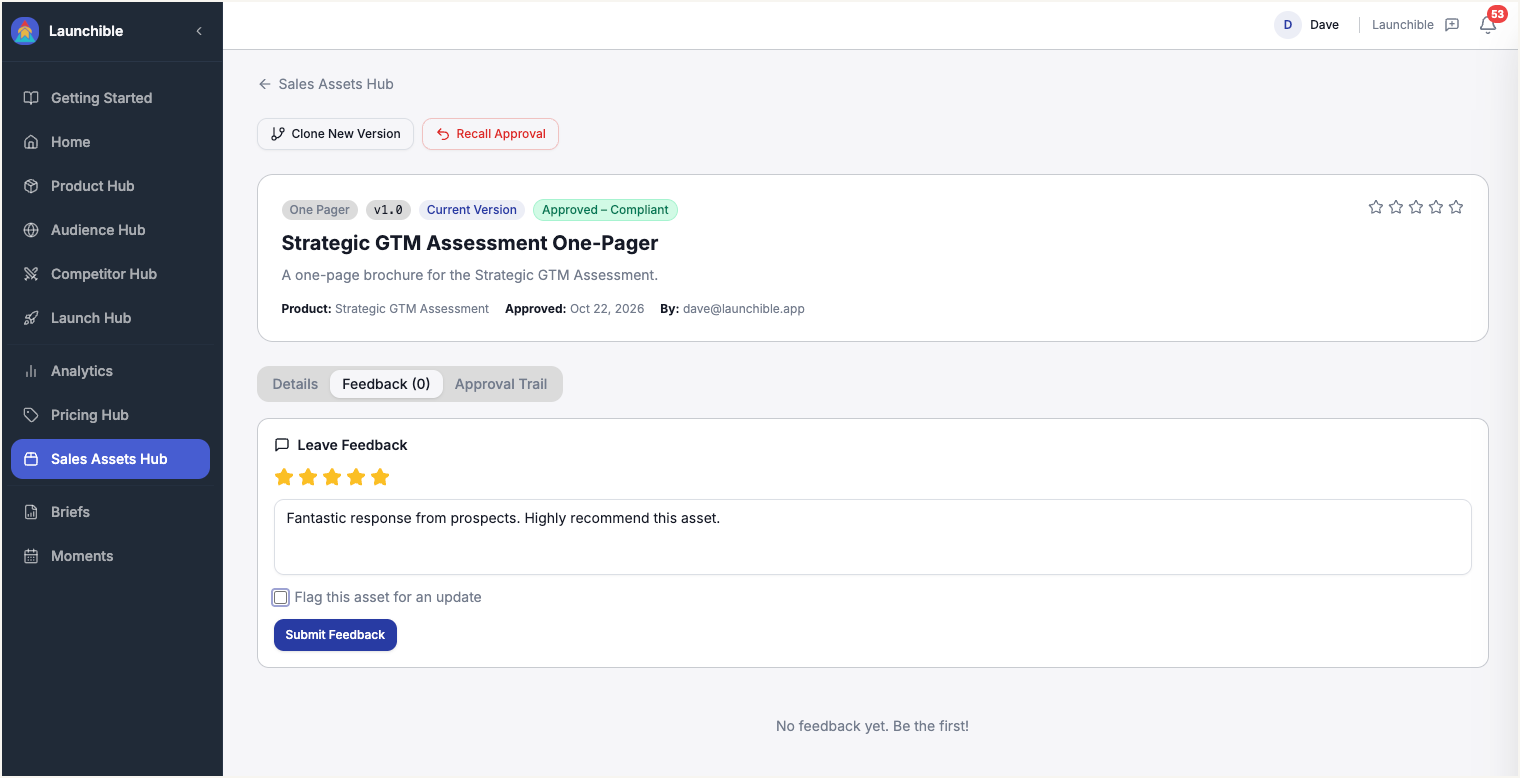
Reps get a say in the library too. Rep ratings let reps rate any asset in the Sales Assets Hub, so the people who own the library can observe which assets reps like and find most useful in real deals. Approval tells you an asset is safe to use. Ratings tell you whether reps think it's worth using. A rating doesn't change an asset's approval. It tells the owner where to look first when deciding what to improve, replace or retire.
And when the asset a rep needs doesn't exist yet, they can say so. Rep recommendations let reps suggest new sales assets in the Hub, so the gap a rep runs into on a call is on record instead of lost in a Slack thread. A suggestion is only a starting point. Anything built from it goes through the same three approvals as every other asset.
Living Battlecards that show only what you've approved
The Competitor Hub post left this part for here. Living Battlecards™, Launchible's dynamic battlecards, are battlecards you create from the Competitor Hub that show only the competitive insights your team has approved. Elsewhere, a dynamic battlecard usually means one fed by automated competitor monitoring; Launchible's isn't. A Living Battlecard lives in the Sales Assets Hub and automatically reflects every approved insight about that competitor, while drafts and rejected or withdrawn claims never appear. Every claim on it is already approved, so it needs no separate approval.
That last point is the interesting one. A one-pager goes through three stages because it's one document making many claims, and someone has to vouch for all of them together. A Living Battlecard doesn't, because the vouching already happened upstream, one claim at a time, by the person who could actually check each claim. The approval moved from the card to the claim.
So the card can't drift out of its approved state. It has no content of its own to drift. Everything on it is a claim someone already approved.
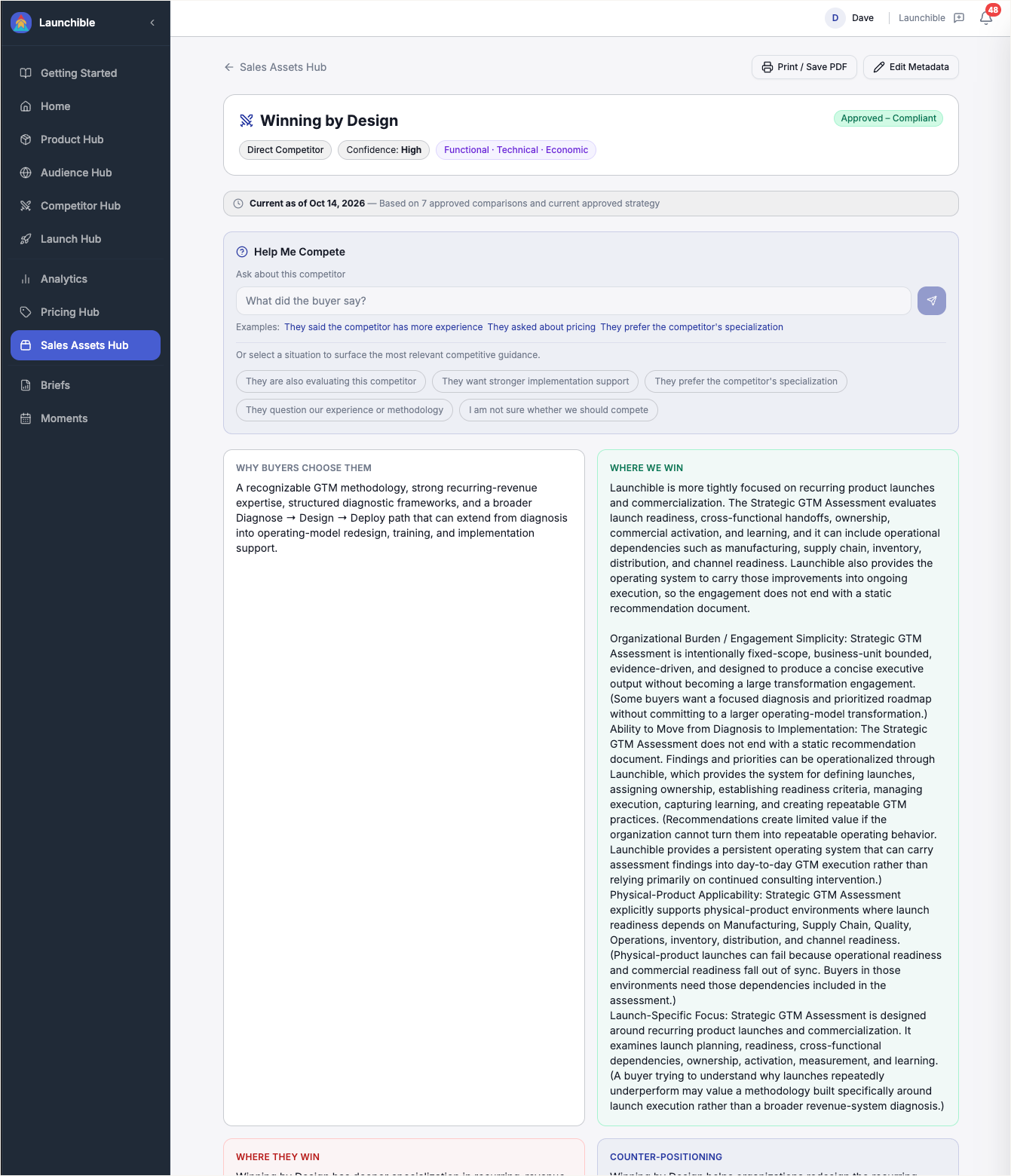
A Living Battlecard shows only the competitive insights approved in the Competitor Hub.
Living Pricing Guides™, Launchible's dynamic pricing guides, apply the same idea to pricing: they pull approved pricing and packaging from the Pricing Hub into a sales-ready format, and the Sales Assets Hub governs whether the guide is approved for use. They get a post of their own.
How the Sales Assets Hub connects to the other Hubs
Sales assets are the last mile. Every other Hub's approved work reaches a buyer through them, in every GTM motion: a launch, a renewal, a competitive deal, a pricing change.
The Product Hub holds what you actually ship, which is what every asset describes. The Audience Hub holds the segments, ICP, personas and messaging an asset is written for. The Competitor Hub supplies the approved claims on every Living Battlecard. The Pricing Hub supplies the approved pricing in every Living Pricing Guide.
The Launch Hub is where assets meet a specific launch. Approved sales assets appear in the Launch Hub for the launches they apply to, without the launch keeping its own copies. One asset, one current version, for every launch that uses it.
Sales assets also carry weight in sales launch readiness. An approved asset can be attached as evidence for a readiness capability, such as "Salesperson can answer common security questions." If that asset is later recalled, rejected, superseded or reapproved, Launchible flags that the basis for the readiness judgment changed. It doesn't rewrite the judgment. It tells the team to look again. Build Notes #1 covers how readiness evidence works.
Back to Thursday afternoon
Run Marcus's message again with the Sales Assets Hub behind it.
Priya opens the security one-pager. There's one current version, and its record shows all three approvals, including Marcus's at the legal and compliance stage. She recalls it in the Launchible Sales Assets Hub and types the reason: SOC 2 report delayed; "audit complete" is no longer accurate. From that moment, no rep can get it from the Hub. The one-pager is attached as evidence for the launch's security-readiness capability, so Launchible flags that the basis for that judgment just changed, and the launch owner knows to look again before anyone calls sales ready.
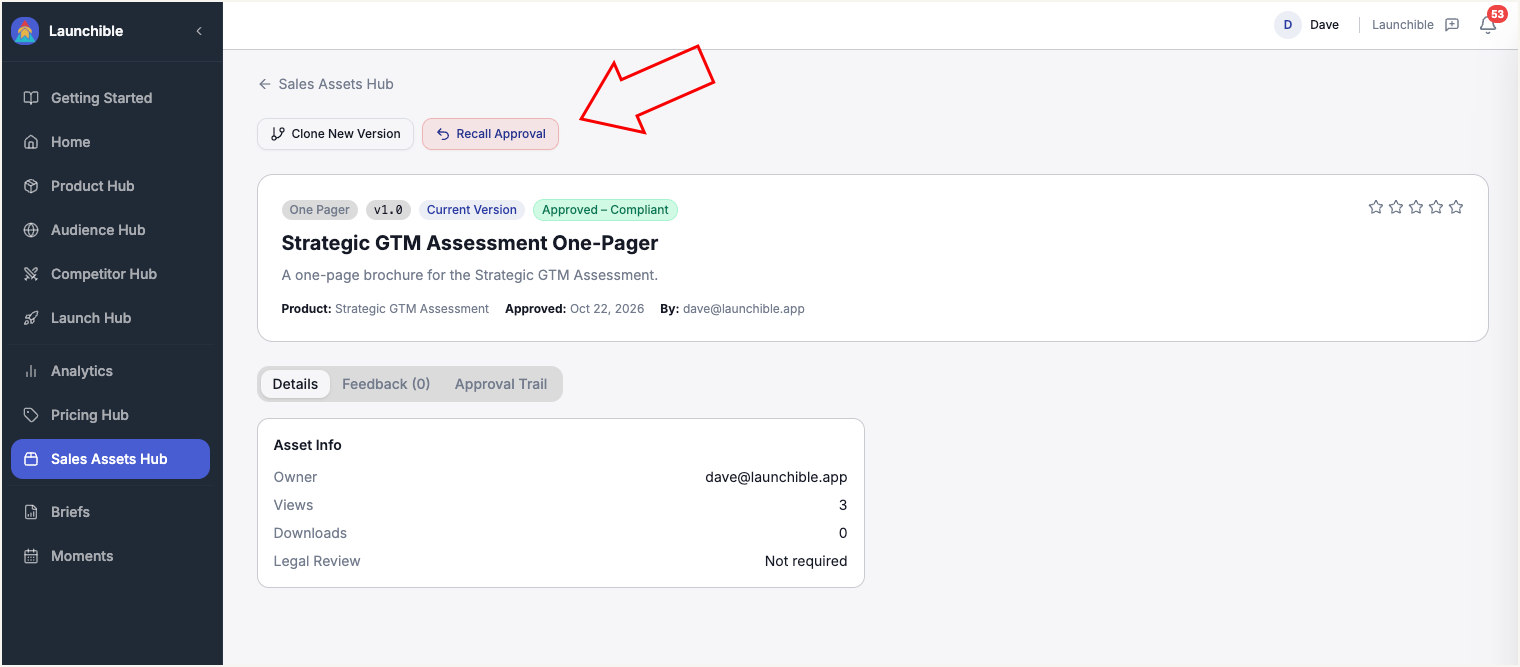
Screenshot showing recalling a sales asset in the Launchible Sales Assets Hub
Then she creates the corrected version and submits it. It goes to content and brand, then to Marcus, then to final sign-off. For a few hours, reps have no security one-pager at all. That's the point. No asset beats a wrong one.
At 4:10 she writes back to Marcus. The version reps can get from the Hub is recalled, with his reason on the record. The corrected version is in his review queue. Copies already sent are still out in the world, and she's asking account teams which deals received one, because no system can reach those. But his question has an answer now, and it took one message to give it.
Notice what didn't change. Nobody got more careful. The auditor still pushed the report. Reps still sent copies. What changed is that approved stopped being a word in a file name and became a state Priya could check, hold and take back.
Approval isn't a moment. It's a state, and now it's one you can observe.
Launchible Sales Assets Hub FAQ
What is the Launchible Sales Assets Hub?
The Launchible Sales Assets Hub is one of six integrated Hubs in Launchible, the GTM Operating System. It keeps one current, approved version of every sales asset where reps find it. Each asset moves through three approval stages: content and brand, legal and compliance, and final sign-off. Each stage has its own approver. An asset can't be edited while it's in review or once it's approved. Reps can rate assets and recommend new ones.
How do you make sure reps only use approved sales collateral?
Treat sales collateral approval as a state, not a moment. Tie each approval to a specific version and lock it, make every change a new version that's reviewed again while the old one stays current, and keep one place where reps get assets, with a way to pull one back right away. File names and review dates can't do this, because they record that someone approved something, not what reps can get today. In Launchible, the Sales Assets Hub works this way: approved assets are locked, every change is a new version that goes back through review, and emergency recall pulls an asset right away.
What is a Living Battlecard?
A Living Battlecard is Launchible's dynamic battlecard: a battlecard you create from the Competitor Hub that shows only the competitive insights your team has approved. Elsewhere, a dynamic battlecard usually means one fed by automated competitor monitoring; Launchible's isn't. It lives in the Sales Assets Hub and automatically reflects every approved insight about that competitor, while drafts and rejected or withdrawn claims never appear. Every claim on it is already approved, so it needs no separate approval. Your team supplies and approves the claims; the battlecard reflects them.
How do you update an approved sales asset?
Create a new version. In Launchible, the new version goes through all three approval stages again, and the current version stays available to reps until the new one is approved. Then the new version becomes current and the old one is superseded, so reps never have two versions to choose from.
What happens when you recall a sales asset?
In Launchible, emergency recall makes a sales asset unavailable in the Sales Assets Hub right away. It requires a reason, it's held by its own permission, and it can't be undone; the fix goes out as a new version that goes through approval again. Recall controls what reps can get from the Hub. It doesn't reach copies that were already downloaded or sent.
If you want every rep working from the approved version, and a way to pull one back the moment it's wrong, Join the beta →
Dave Daniels is the founder of Launchible — the GTM Operating System built to close the Launch Gap between what Product ships and what Sales can actually sell. He has spent 20+ years watching great products underperform at launch because the system around the launch wasn't built to succeed.