
Launchible, the GTM Operating System, organizes everything your GTM motions depend on into six integrated Hubs: Product Hub, Audience Hub, Competitor Hub, Pricing Hub, Launch Hub, and Sales Assets Hub. To keep a sales pricing guide up to date, stop sending sales reps copies of it and give them one guide per product that reads from your approved pricing every time it's opened. Launchible Living Pricing Guides are dynamic pricing guides built that way: each one is a view of the approved pricing in the Pricing Hub, not a copy of it, so it can't fall behind the pricing your team approved. Single Source of Truth for Product Launch: 6 Hubs covers how the Hubs fit together, and the Pricing Hub post covers how pricing gets approved and versioned. This post covers the step after that: getting approved pricing to the rep who's about to quote it.
The pricing guide that went out on time
The new Growth package price was approved on a Tuesday. By Wednesday, Nadia, the PMM who owns pricing enablement, had the pricing guide updated: a fresh PDF, the new number on page two, a version date in the footer. She posted it in the sales channel, pinned it and added one line in bold: delete the old one.
A few weeks later, Carmen in RevOps flagged an order form that didn't match its quote. Jordan had sent a prospect a proposal at the old Growth price. He hadn't ignored Nadia's post. He'd built the proposal from a quote he saved before the change, and the saved quote still had the old number in it.
Carmen went looking and found more. One rep was working from slide 9 of last quarter's deck, which listed priority support as an add-on in a package that now includes it. Another had pasted the old pricing table into the proposal template half the team copies. Nadia had published one pricing guide. The sales team was selling from four.
Jordan called the prospect back to explain why the price on his proposal was wrong. That's the Launch Gap™ at its smallest: the pricing was approved and announced, and it still didn't reach the deal intact.
The standard advice for an outdated sales pricing guide
Ask how to keep a sales pricing guide up to date and you'll get the playbook Nadia ran. Treat the guide as a document. When pricing changes, update the document, put a date or a version number in the file name, post it where reps will find it and ask them to delete the old one. If the change is big, run an enablement session. If reps keep quoting old numbers, remind them again.
That playbook assumes the problem is distribution and discipline: get the new file to everyone, then get everyone to use it. Nadia had both. The file went out the day after approval, and nobody on the team was careless.
Every copy of a pricing guide starts going stale the day it's made
The uncomfortable truth is that a pricing guide built as a copy can't stay current, however well you distribute it.
A PDF, a slide, a saved quote and a pasted table are all copies of your pricing, made on one date. Each one is right on the day it's made and wrong after the next approved change, and none of them knows it. They don't expire. They don't carry a warning. They sit in downloads folders, inboxes and proposal templates, looking exactly as trustworthy as the day they were made.
Every pricing change adds to the pile. A new version doesn't replace the old copies; it joins them. And reps don't hunt for the newest file before every call. They use the one they can find fastest, which is usually the one they used last time.
Reps aren't ignoring the new guide. The old ones still exist, and nothing tells a rep which number is current at the moment they quote it. Publishing harder doesn't fix that. The guide has to stop being a copy.
What is a dynamic pricing guide?
A dynamic pricing guide is a sales pricing guide that shows your current approved pricing whenever it's opened, instead of a fixed copy made on one date. It isn't dynamic pricing, which usually means prices that change automatically, the way airline fares do. In a dynamic pricing guide, a price changes only when your team approves a new one.
Launchible Living Pricing Guides are Launchible's dynamic pricing guides. A Launchible Living Pricing Guide is assembled from the current approved packages and prices in the Pricing Hub every time someone opens it. Nothing on it is stored as a snapshot, so the guide that reps open is never an old copy.
How a Launchible Living Pricing Guide stays current
You create A Living Pricing Guide from the Pricing Hub: Create Pricing Guide sits on the Packages and Comparison tabs. Pick the product, then include every current approved package for that product or a selected set. Publish it, and the guide lives in the Sales Assets Hub with everything else reps sell from. There's one active pricing guide per product.
From then on, the guide reads from approved pricing. Only approved, active packages and prices appear on it. Drafts never do, rejected pricing never does and superseded pricing never does. When a new price is approved in the Pricing Hub, the guide shows it without anyone republishing anything. When a package is replaced by a newer version, the guide follows it to the current one.
Changing the guide itself works differently. Renaming it, rewriting its description or changing which packages it includes updates the pricing guide. There's still one guide per product, and it's still the current one.
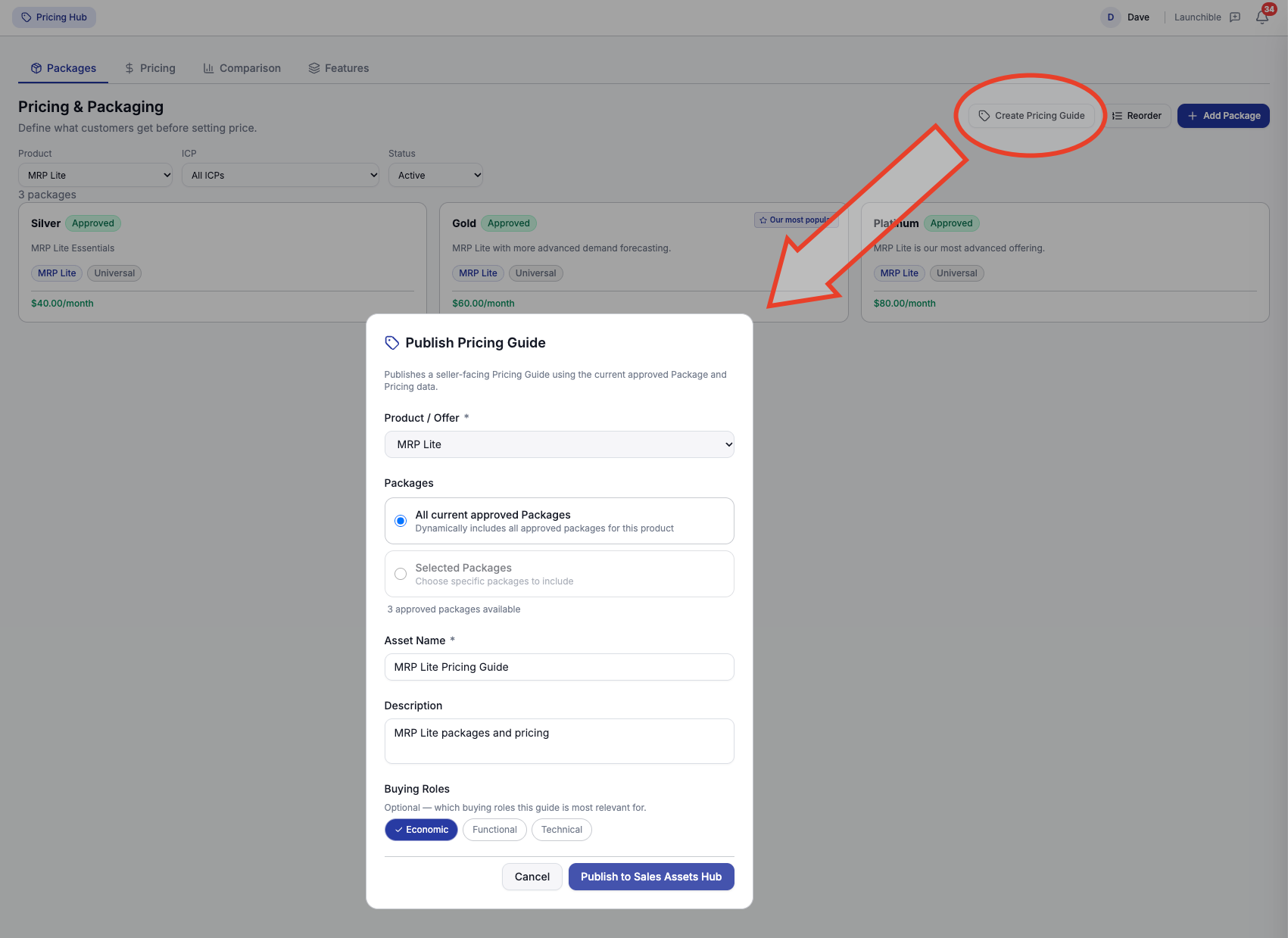
Create a Launchible Living Pricing Guide from the Pricing Hub, for one product and all or some of its approved packages.
What a Launchible Living Pricing Guide shows sales reps
A pricing guide earns its place by answering the questions reps get on calls. For each package, a Launchible Living Pricing Guide shows:
- The package name and description, and which package is recommended
- "Which Package Should I Use?" selection criteria, so a rep can match a buyer to a package without guessing
- The included features, each with its description
- The service, support and implementation levels
- Add-ons that have their own approved price (an add-on without one is left off, so nobody quotes a price your team never approved)
- The standard price
When other approved prices exist for a package, by geography, channel or customer type, the guide says so. A rep working a partner deal or a buyer in another region knows the standard price isn't the whole answer before they quote it.
Every guide shows a "Current as of" date, so a rep knows what they're looking at.
What stays off the guide matters as much. The pricing rationale, the confidence and evidence behind each price, and the review notes your team keeps in the Pricing Hub never appear on it. Reps get what to sell and at what price, not the internal debate behind it.
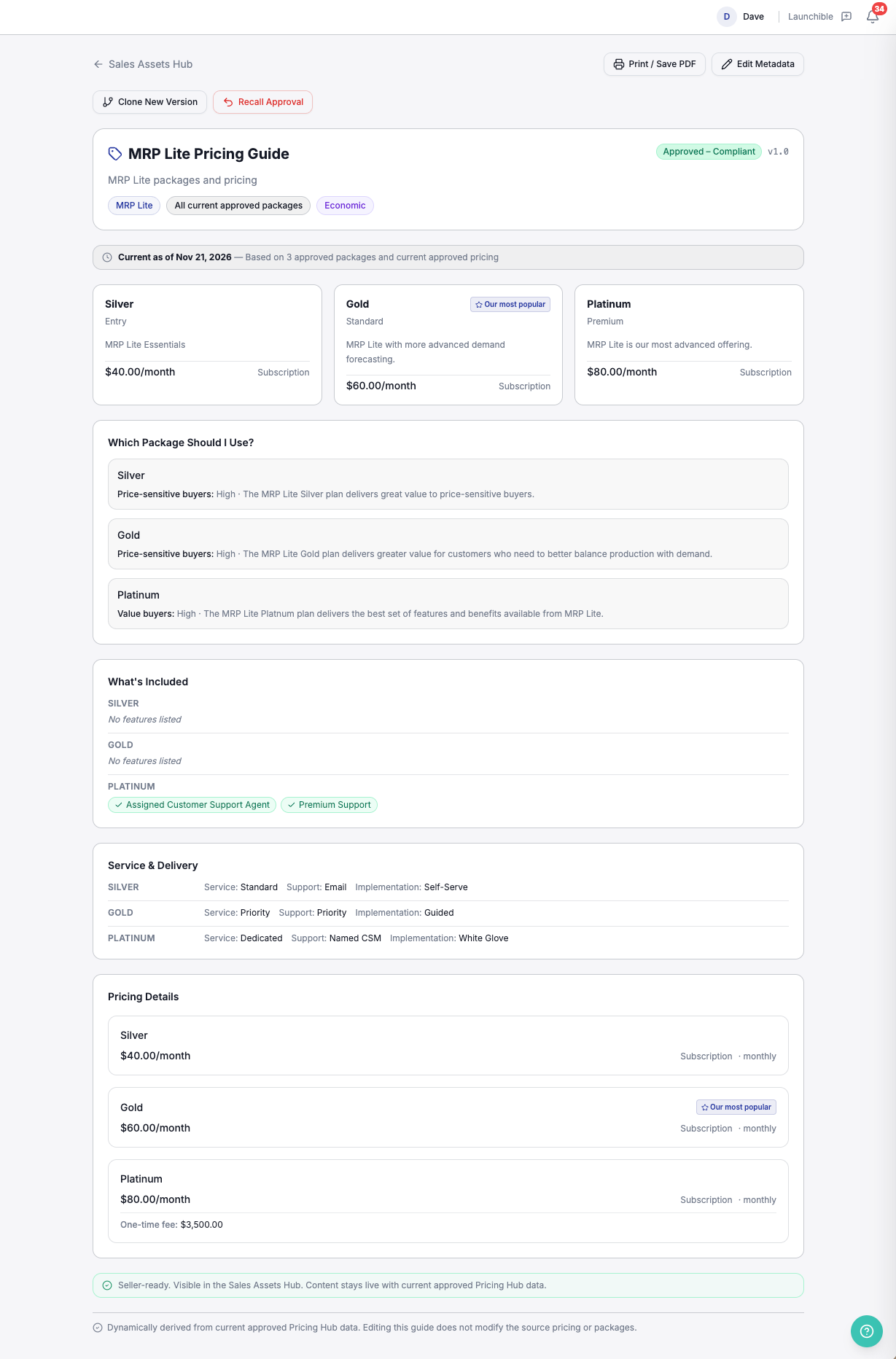
For each package, reps get its features, service levels, approved add-ons and standard price, with a "Current as of" date.
Why a Launchible Living Pricing Guide doesn't need a second approval
Most sales assets go through a three-stage approval in the Sales Assets Hub before reps can use them; the Sales Assets Hub post covers how. A Launchible Living Pricing Guide doesn't. It publishes straight to seller-ready.
Skipping that step is deliberate. Every price on the guide was already approved in the Pricing Hub, by the people who own pricing, before it could appear. A second approval would ask someone to sign off on the same numbers twice, and while it waited, reps would quote from whatever copy they had. Approval happens once, where the pricing decision is made.
Launchible Living Battlecards work the same way. They show only the competitive claims your team has already approved in the Competitor Hub, so the approval that matters has happened before a rep opens the card.
What a Launchible Living Pricing Guide can't do: update a printed copy
A Launchible Living Pricing Guide can be printed or saved as a PDF, for a buyer who wants something to keep or a procurement team that needs an attachment. That copy is a snapshot as of the day it was printed. It won't update when pricing changes, and nothing in Launchible reaches into a buyer's inbox to fix it.
Use the printed copy for what it is: a record of what you showed a buyer on a given date. When a rep needs to quote, they open the guide in the Sales Assets Hub, where the price is the approved one.
Who uses a Launchible Living Pricing Guide between launches
Launches are occasional. The work behind them isn't. Pricing changes in the weeks nobody calls "launch": a package gets reworked, an add-on gets its own price, a regional price gets approved for a new market. That's when a Launchible Living Pricing Guide does its job.
PMMs who own pricing enablement approve the change in the Pricing Hub, and the guide is done. No new export, no pinned post, no "delete the old one" message, because the guide reps use already shows the approved price.
Sales leaders coach deals from the same numbers their reps quote. When a manager and a rep open the guide, they're looking at the same approved pricing.
RevOps checks quotes against one source instead of four. The standard price on the guide is the approved one, and the guide flags when a deal may need a different approved price for its geography, channel or customer type.
Reps open one guide per product, with a "Current as of" date on it, and quote from it without asking the sales channel whether it's still right.
None of it waits for a launch date, and all of it is why the pricing is right when the next launch comes.
Back to the price change
Run the month again with a Launchible Living Pricing Guide behind it.
The new Growth price is approved in the Pricing Hub on Tuesday. On Wednesday, Nadia doesn't export anything. The Growth package in the guide already shows the new price.
When Jordan builds his proposal, he opens the guide instead of his saved quote, and the number he copies is the approved one. Carmen's order form matches. The old PDF is still in Jordan's downloads folder, and it's still wrong, but nobody's selling from it.
Notice what didn't change. Finance still approved the price. Nadia still owns pricing enablement. Jordan still writes the proposal. What changed is that the guide stopped being one more copy to keep up with.
Products ship. Launches don't. Pricing works the same way: an approved price isn't sold until it reaches the rep intact. A pricing guide that's a view of approved pricing, not a copy of it, is how it gets there.
Launchible Living Pricing Guides FAQ
How do you keep a sales pricing guide up to date when pricing changes?
To keep a sales pricing guide up to date, stop distributing copies and give reps one guide per product that reads from your approved pricing each time it's opened. A PDF, a slide or a saved quote is right on the day it's made and wrong after the next approved change. In Launchible, a Launchible Living Pricing Guide works this way: when a new price is approved in the Pricing Hub, the guide shows it without being republished, and a superseded package is followed to its current version.
What is a Launchible Living Pricing Guide?
Launchible Living Pricing Guides are dynamic pricing guides in Launchible, the GTM Operating System. A Launchible Living Pricing Guide is created from the Pricing Hub for one product and published to the Sales Assets Hub. It's a view of your approved pricing, not a copy: it's assembled from the current approved packages and prices each time it's opened, so it shows a newly approved price without being republished. Drafts, rejected pricing and superseded pricing never appear on it.
What is a dynamic pricing guide?
A dynamic pricing guide is a sales pricing guide that shows your current approved pricing whenever it's opened, instead of a fixed copy made on one date. It isn't dynamic pricing, which usually means prices that change automatically. In a dynamic pricing guide, a price changes only when your team approves a new one.
What does a Launchible Living Pricing Guide show reps?
For each package: the name and description, a recommended label, "Which Package Should I Use?" selection criteria, included features with descriptions, service, support and implementation levels, add-ons that have their own approved price, and the standard price. It notes when other approved prices exist by geography, channel or customer type, and it shows a "Current as of" date. Internal notes, such as pricing rationale, confidence, evidence and review notes, never appear.
Does a Launchible Living Pricing Guide need approval in the Sales Assets Hub?
No. A Launchible Living Pricing Guide publishes straight to seller-ready, without the three-stage approval other sales assets go through, because every price on it was already approved in the Pricing Hub. Launchible Living Battlecards follow the same logic.
Does a printed pricing guide update itself?
No. A Launchible Living Pricing Guide can be printed or saved as a PDF, and that copy is a snapshot as of the date it was printed. It won't update when pricing changes. The guide in the Sales Assets Hub is the one that stays current.
Does Launchible set or change prices?
No. Launchible doesn't set, recommend or optimize prices, and it never changes a price automatically. Your team decides and approves pricing in the Pricing Hub, and a Launchible Living Pricing Guide shows what your team approved.
If you want reps quoting from one pricing guide that can't fall behind your approved pricing, Join the beta →
Dave Daniels is the founder of Launchible — the GTM Operating System built to close the Launch Gap between what Product ships and what Sales can actually sell. He has spent 20+ years watching great products underperform at launch because the system around the launch wasn't built to succeed.